


ECU OVERVIEW
Everything you need to know about your S-SERIES ECU with Switch Technology::
UNDERSTANDING THE ECU
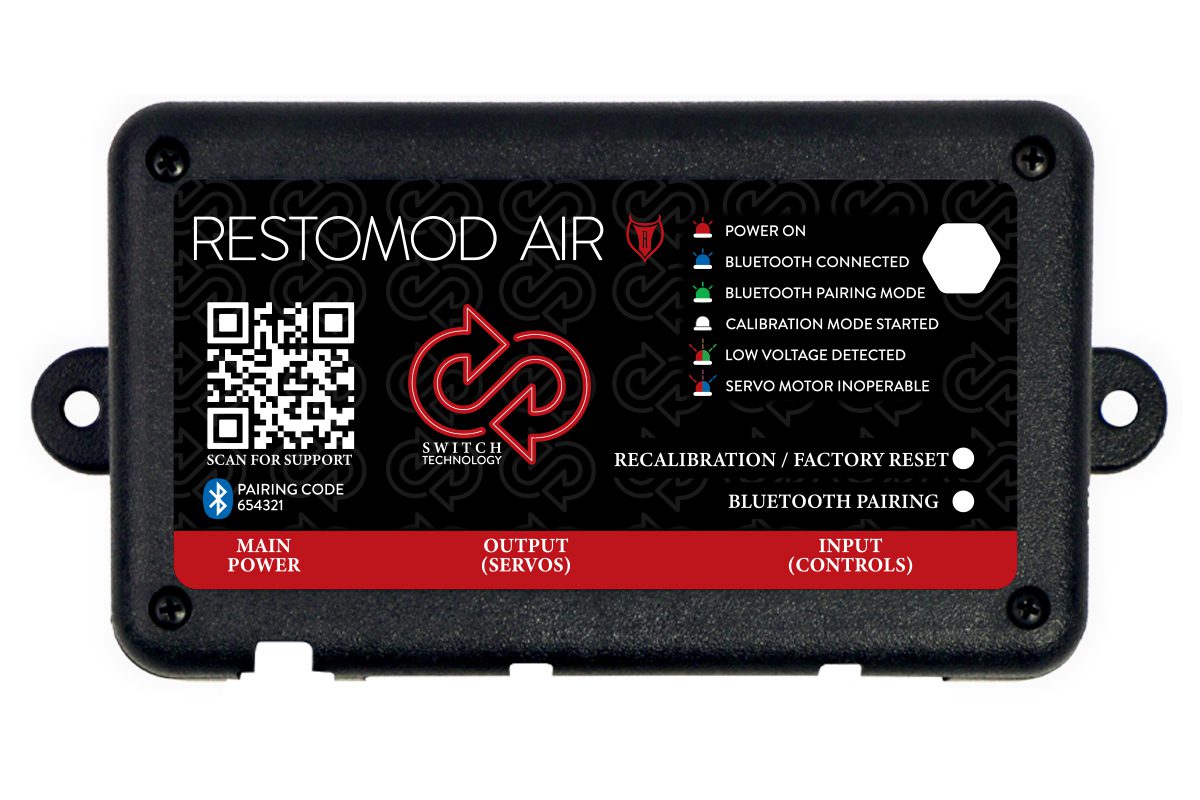
What do the LED’s mean?
SYSTEM STATUS
FLASH RED: Power On – Operation Mode
A flashing red LED means the system is powered on and should be functioning correctly.
FLASH BLUE: Bluetooth Connected
Flashing blue LED indicates that the system is receiving a Bluetooth signal. Your paired device should be capable of controlling your system’s functions and providing current status updates along with diagnostic information.
FLASH GREEN: Bluetooth Pairing Mode
A flashing green LED indicates that the system is in pairing mode and ready to receive a Bluetooth signal. To pair a device, simply access your device’s Bluetooth settings and select the system’s name to establish the connection.
Note: The PIN no longer needs resetting with each use in this version. However, for security reasons, users can reset the PIN if needed, ensuring that only those with the chosen PIN can connect to their system.
SOLID WHITE: Calibration Mode Started
Solid white LED indicates that the system is calibrating. During calibration, each motor takes a turn moving through its full range of motion to calibrate the open and closed positions. Once calibration is complete, the LED should start flashing red.
SYSTEM FAULTS
SOLID RED: Factory Reset
A solid red LED means the system has been factory reset.
FLASH RED & GREEN: Low Voltage Detected
A flashing red and green LED indicates a low-voltage system fault. This occurs when the ECU isn’t receiving the correct voltage, triggering a safety shutoff to protect the system. Ensure your system is directly connected to the battery and that your power and ground connections are secure.
FLASH RED & BLUE: Servo Motor Inoperable
A flashing red and blue LED indicates a motor malfunction, potentially due to a loose connection, a faulty motor, or another error. Begin troubleshooting by ensuring all connectors are securely clipped into both the motors and ECU. Power cycle the system and listen for any clicking noises, as they may indicate a problematic motor. Try recalibrating your system to reset the motors.
RECALIBRATION/RESET BUTTON:
The recalibration/factory reset button is used to calibrate or factory reset the system. Hold the button until the blower motor pulses (approximately 3 seconds) to initiate calibration mode; the LED should turn solid white. Continue holding the button until the blower pulses twice quickly (around 10 seconds) to factory reset the ECU; you should see the LED turn solid red.
BLUETOOTH PAIRING BUTTON:
The Bluetooth pairing button is used to pair your device to the ECU. Holding the button for 1 second should prompt the LED to start flashing green.
UNDERSTANDING THE ECU
What do the LED’s mean?
SYSTEM STATUS
FLASH RED: Power On – Operation Mode
A flashing red LED means the system is powered on and should be functioning correctly.
FLASH BLUE: Bluetooth Connected
Flashing blue LED indicates that the system is receiving a Bluetooth signal. Your paired device should be capable of controlling your system’s functions and providing current status updates along with diagnostic information.
FLASH GREEN: Bluetooth Pairing Mode
A flashing green LED indicates that the system is in pairing mode and ready to receive a Bluetooth signal. To pair a device, simply access your device’s Bluetooth settings and select the system’s name to establish the connection.
Note: The PIN no longer needs resetting with each use in this version. However, for security reasons, users can reset the PIN if needed, ensuring that only those with the chosen PIN can connect to their system.
SOLID WHITE: Calibration Mode Started
Solid white LED indicates that the system is calibrating. During calibration, each motor takes a turn moving through its full range of motion to calibrate the open and closed positions. Once calibration is complete, the LED should start flashing red.
SYSTEM FAULTS
SOLID RED: Factory Reset
A solid red LED means the system has been factory reset.
FLASH RED & GREEN: Low Voltage Detected
A flashing red and green LED indicates a low-voltage system fault. This occurs when the ECU isn’t receiving the correct voltage, triggering a safety shutoff to protect the system. Ensure your system is directly connected to the battery and that your power and ground connections are secure.
FLASH RED & BLUE: Servo Motor Inoperable
A flashing red and blue LED indicates a motor malfunction, potentially due to a loose connection, a faulty motor, or another error. Begin troubleshooting by ensuring all connectors are securely clipped into both the motors and ECU. Power cycle the system and listen for any clicking noises, as they may indicate a problematic motor. Try recalibrating your system to reset the motors.
RECALIBRATION/RESET BUTTON:
The recalibration/factory reset button is used to calibrate or factory reset the system. Hold the button until the blower motor pulses (approximately 3 seconds) to initiate calibration mode; the LED should turn solid white. Continue holding the button until the blower pulses twice quickly (around 10 seconds) to factory reset the ECU; you should see the LED turn solid red.
BLUETOOTH PAIRING BUTTON:
The Bluetooth pairing button is used to pair your device to the ECU. Holding the button for 1 second should prompt the LED to start flashing green.
HARNESSES
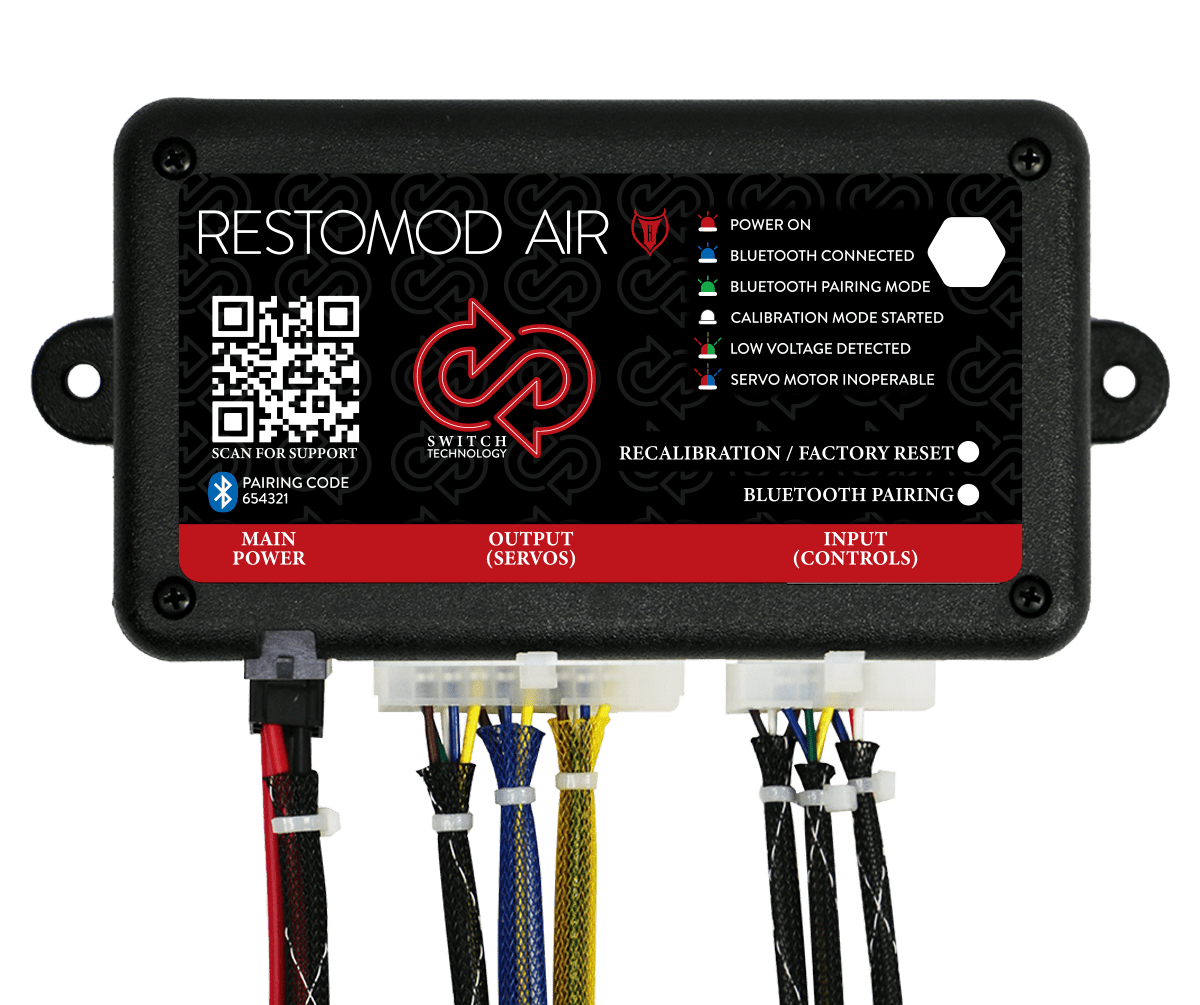
Restomod Air’s plug-and-play connections, combined with Simplified Wiring, enable you to confidently perform the installation yourself. Each port on the ECU is clearly labeled to distinguish between each plug, and each plug is of a different size, ensuring that only the correct plug can be inserted. The photo shows how the harnesses connect to the ECU.
HARNESSES
Restomod Air’s plug-and-play connections, combined with Simplified Wiring, enable you to confidently perform the installation yourself. Each port on the ECU is clearly labeled to distinguish between each plug, and each plug is of a different size, ensuring that only the correct plug can be inserted. The photo shows how the harnesses connect to the ECU.